
Cancel a sale or give a refund
Undo a finished sale. The items go back into stock and the sale leaves your totals.
There are two situations.
- The sale is not finished yet (you have not clicked Complete): just delete the ticket. Click the red bin above the ticket on the register.
- The sale is finished: you void it. To void means to cancel a sale after it was completed.
Void a finished sale
- Go to .
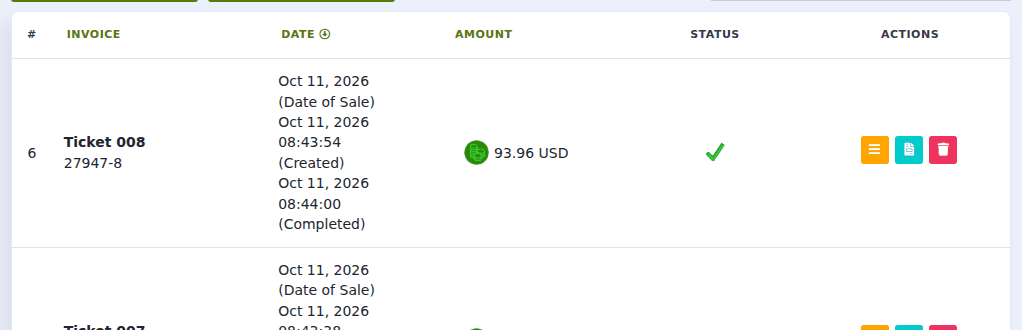
- Find the sale. If it was not made today, change the dates at the top. See Find a past sale.
- At the end of its row are small coloured buttons. Click the red one, Void. (Rest your mouse on a button to see its name.)
- Quid asks you to confirm. Click OK.
What happens:
- The sale is marked Cancelled. It stays on record, so there is always a trail.
- The items go back into your stock count.
- The amount comes off your sales totals.
- If the sale was on account, the amount comes off what the customer owes.
Voiding does not hand the money back. Give the customer their cash yourself, or refund their card on your card machine.
The customer returns only one item of several
Quid cancels a whole sale, not part of one. So:
- Void the original sale.
- Ring up a new sale with only the items the customer is keeping.
- Give back the difference.
The customer wants to swap an item
Do the same: void the original sale, then ring up a new one with the replacement item.
Marking a sale "Refunded"
If you open a sale's Details you may also see Refund. This marks the sale as refunded for your records. Use Void when the goods come back and should return to stock.
I do not see a Void button.
Your login may not be allowed to cancel sales. Ask the owner; the permission is "Manage Transactions". See Decide what each staff member may do (roles).
Can I bring back a sale I voided by mistake?
No. Ring it up again. If the date matters, set the Date of Sale when you create the ticket. See Serve several customers at once (open tickets).