
Serve several customers at once (open tickets)
Park a half-finished sale, serve someone else, and come back to it. Also how to name a ticket and back-date a sale.
A ticket is one customer's sale in progress. You can have many tickets open at the same time. Nothing is lost when you move between them.
Start a second ticket
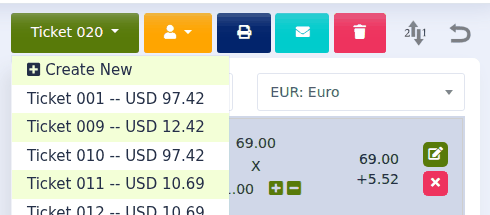
- Click the ticket button above the ticket. It shows the current ticket's name, for example Ticket 010.
- Click Create New.
- If you like, type a Ticket Name so you can recognise it later ("Mr Lim, pickup truck"). You can also pick a customer.
- Click Create.
You now have an empty ticket. The first one is safe and waiting.
Go back to a waiting ticket
Click the ticket button again. Every open ticket is listed with its total. Click the one you want.
Enter a sale that happened earlier
When you create a ticket you can set the Date of Sale. Use this for sales you wrote on paper while the internet was down, or yesterday's sale that someone forgot to ring up. The sale then appears on the right day in your reports.
Tidy up at the end of the day
Open tickets stay open until you finish or delete them, even overnight. Before you close:
- Finish the ones that were paid: open each and click CHECKOUT.
- Delete the ones that are no longer needed: open each and click the red bin.
- If a customer will come back to collect and pay, consider saving it as an order instead. See Quotes and orders: follow a deal from offer to sale.
When you log in and there are tickets left open from before, Quid tells you how many and gives you a link to look at them.