
Discounts and special prices
Two ways to charge less: a percentage off the whole sale, or a second price such as "Trade" on each item.
A percentage off the whole sale
- Ring up the items as usual.
- Under the total, click Apply Discount.
- Type the percentage. Like the money boxes, this box fills in from the right: for ten percent, type 1000 so that it reads 10.00. Watch the box as you type.
- If you like, type a short Discount Note such as "opening week" so you remember why.
- Click the green tick. The total goes down, and the discount shows as its own line.
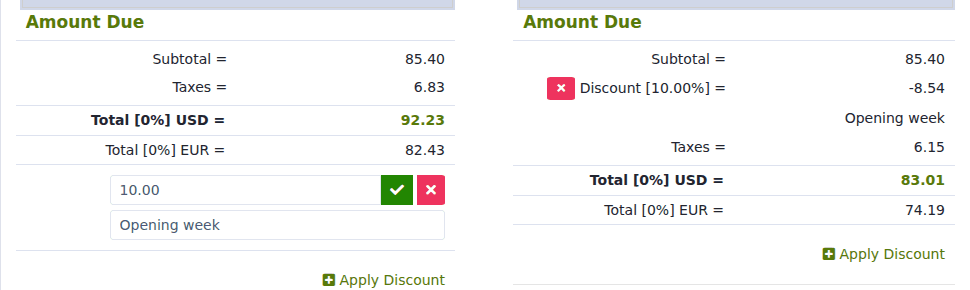
To take the discount off again, click the small red × beside the Discount line.
A different price for some customers (price levels)
Every item can have up to five prices, each with its own name. For example:
| Price | Name you give it | Who it is for |
|---|---|---|
| Price 1 | Counter | Anyone who walks in |
| Price 2 | Trade | Tradespeople and regulars |
| Price 3 | Contractor | Big buyers |
To set the prices, open the item and fill in Price 2, Price 3 and so on, with a name in the Label box beside each. See Add an item to sell.
To sell at one of them, click the small arrow next to the item's button on the register and choose the price from the list. Clicking the main button always uses Price 1.
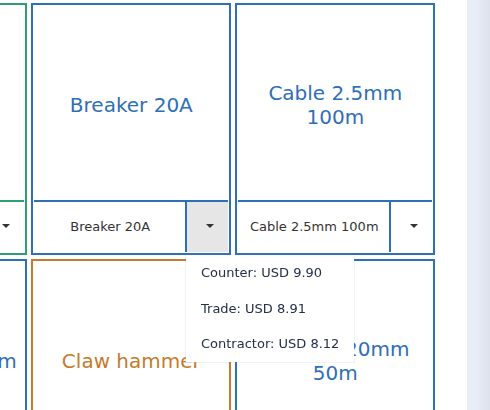
Use the same names on every item ("Counter", "Trade", "Contractor"). Your sales report can then show how much you sold at each price.
A one-off price for a single line
Click the green pencil on the line and type a new price. See Change the quantity or price of an item on the ticket.
Which should I use?
For a regular arrangement with a type of customer, use a price level. For a promotion on everything, use Apply Discount. For haggling over one item, change the line price.