
Make a sale
Ring up items, take the money and give a receipt. The most important page in this help.
Before you start
- The register must be started. See Start and stop the register.
- You need at least one item to sell. See Add an item to sell.
The steps
- Click in the menu.
- Add what the customer is buying. Click the button for each item. Every click adds one. The item appears on the ticket on the right.
Cannot see the item? Type part of its name in Search Inventory, or scan its barcode.
- Check the ticket. Look at the list on the right. Is everything there? Is the number of each correct?
- To add one more of an item, click the small green + on its line.
- To take one away, click the small green –.
- To remove a line completely, click the red ×.
- Tell the customer the total. It is the green number next to Total.
- Click CHECKOUT. A panel opens on the right.
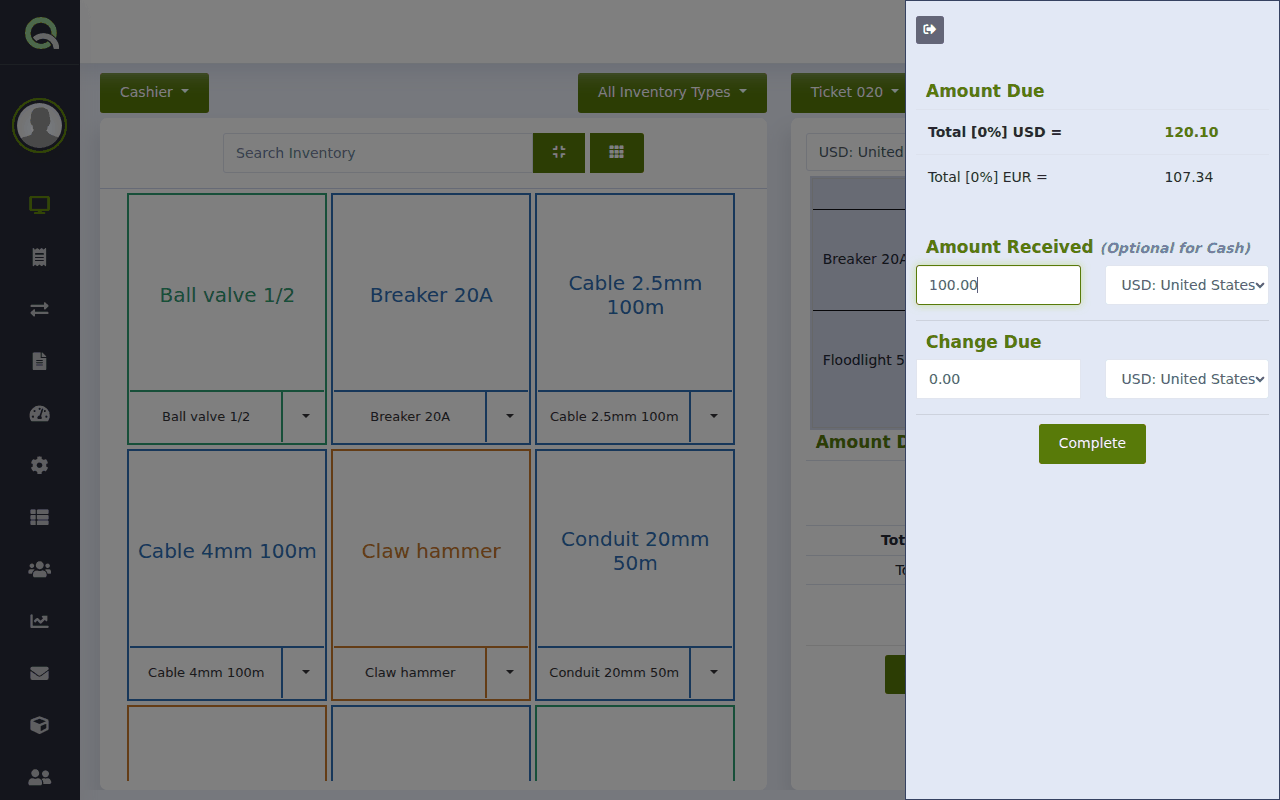
The checkout panel. - Take the money.
- Paying in cash with the exact amount? You can leave "Amount Received" empty.
- Customer gave you a larger note? Type what they gave you. Quid shows the Change Due: the money to hand back.
- Click Complete.
That is it. The sale is saved, your stock is reduced, and the ticket clears, ready for the next customer.
The amount box fills in from the right, like a calculator or a card machine. To enter 50.00, type 5000. Typing 50 gives you 0.50. Watch the box as you type.
Give a receipt
Click the blue printer button above the ticket to print a receipt, or the envelope button to email it. You can do this before or after you complete the sale. More: Print or email a receipt or invoice.
What if…
The customer changed their mind before paying.
Remove the lines they do not want with the red ×. To cancel the whole ticket, click the red bin button above the ticket.
I completed the sale and then noticed a mistake.
You cannot edit a finished sale, but you can cancel it and ring it up again. See Cancel a sale or give a refund.
The customer wants to pay by card.
The customer wants to pay part now and the rest later.
See Take a deposit or a part payment, or for regular customers Sell on credit (customer accounts).
A message says "Only 2 in stock".
Quid is warning you that its count for this item is lower than what you are selling. You can still sell. See "Only 2 in stock": the low stock warning.
I need to serve another customer before this one has finished.
Leave this ticket open and start another. See Serve several customers at once (open tickets).