
Decide what each staff member may do (roles)
Create roles such as Cashier or Manager and choose exactly which parts of Quid each can use.
Where to find it Open this screen in Quid POS
A role is a named list of permissions. You give each team member one role. Change the role, and everyone who has it changes with it.
Create a role
- Go to .
- Type a Role Name, for example "Cashier".
- Tick the permissions this role should have.
- Save.
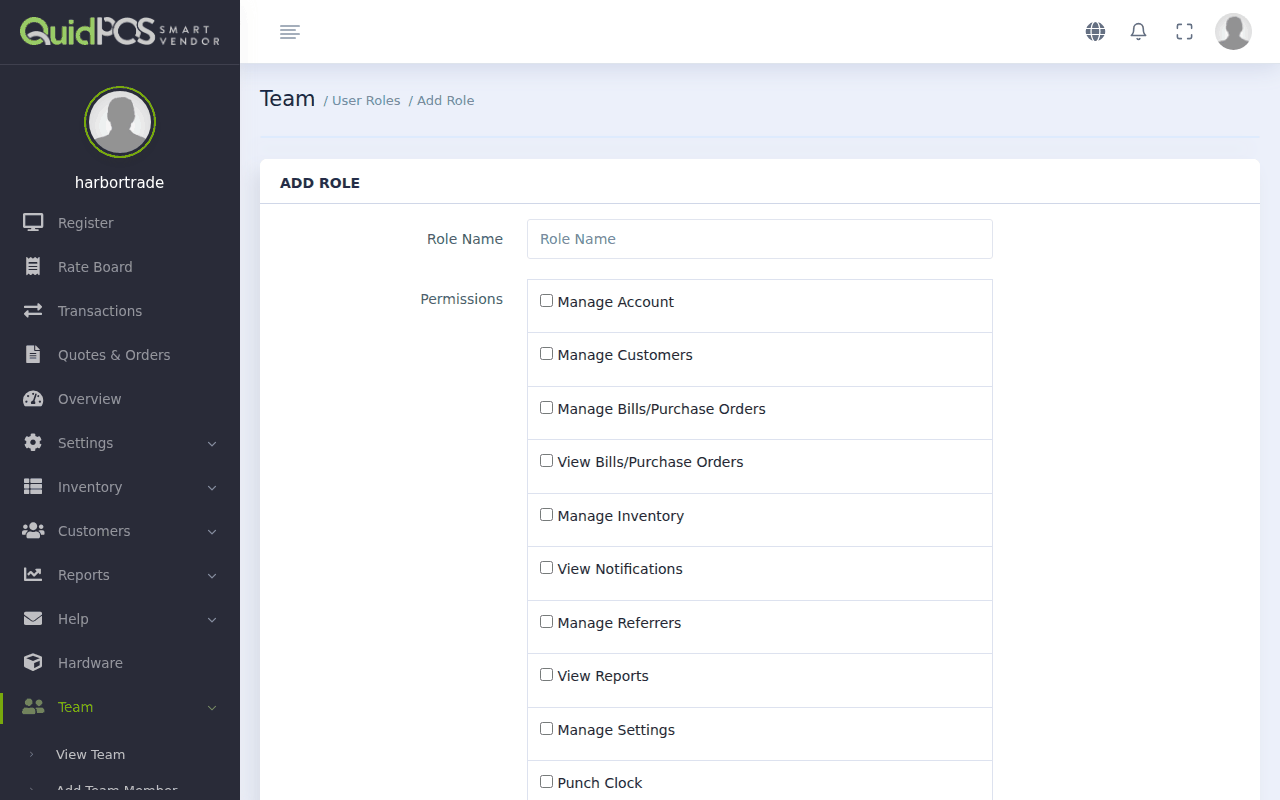
What each permission allows
| Permission | Lets the person… |
|---|---|
| Manage Transactions | Sell on the register, and void sales. |
| Manage Customers | Add and change customers, record their payments. |
| Manage Inventory | Add and change items, prices and stock counts. |
| Manage Suppliers | Add and change suppliers. |
| View Bills/Purchase Orders | Look at purchase orders and bills. |
| Manage Bills/Purchase Orders | Create and change them, and receive stock. |
| View Reports | Open reports and the Overview page (sales, profit, stock value). |
| Manage Settings | Change tax, currency, receipts and business details. |
| Manage Team Members | Add staff and change roles. |
| Manage Referrers | Add and change referrers. |
| Manage Account | See and change your plan and billing. |
| View Notifications | See messages from Quid. |
| Manage Online Store Settings / Orders | Run the web store. |
| Punch Clock | Clock in and out. |
Three roles that suit most shops
| Role | Tick these |
|---|---|
| Cashier | Manage Transactions, Manage Customers, Punch Clock |
| Stock keeper | Manage Inventory, Manage Suppliers, Manage Bills/Purchase Orders, Punch Clock |
| Manager | Everything except Manage Account |
Tip
Give people the least they need. A cashier who cannot see costs and profit cannot share them by accident.
Change a role
Go to , open the role, change the ticks and save. The change applies the next time those team members open a page.
Can the owner's access be limited?
No. The owner login (the one that created the account) can always do everything.
Did this answer your question? If not, email us and tell us what you were trying to do. We read every message.