
Start and stop the register
Open your till at the start of the day and close it at the end.
Where to find it Open this screen in Quid POS
In Quid, a register is one selling point in your shop: one till, one counter. Before you can sell, the register has to be started. This tells Quid who is selling and when the day began.
Start the register
- Click in the menu.
- A green box appears with the register's name and the word (Closed).
- Click Start Register.
- If Quid asks for an opening balance, count the cash in your drawer, type the amount and confirm. (Quid only asks this when till counting is switched on. See Till count: check the cash in your drawer.)
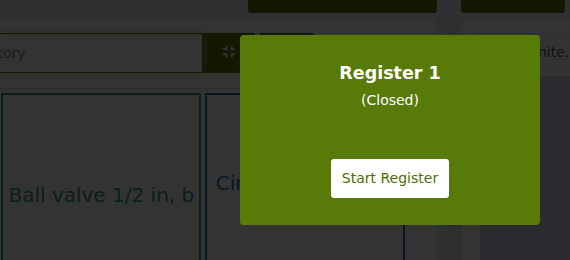
The box disappears and you can sell.
The box says "Working" and shows someone's name
That means the register was started earlier and not stopped, by you or by a colleague. You have two choices:
- Control Register: carry on selling on this register. Use this when you are taking over from a colleague or coming back after a break.
- Stop Register: close the register for the day.
Stop the register
- Click in the menu so that the green box shows again.
- Click Stop Register.
- If Quid asks for a closing balance, count the cash in the drawer and type the amount.
Tip
Stop the register every night. Your Till Count report then shows one clear line for each day.
The Start Register button is grey and I cannot click it.
Either another person is using this register right now, or your plan has run out. Ask the owner to check . See Your plan, add-ons and paying for Quid.
We have two tills. How do I get a second register?
Each extra register is a small add-on to your plan. See Registers: one for each till.
Did this answer your question? If not, email us and tell us what you were trying to do. We read every message.