
Quotes and orders: follow a deal from offer to sale
The Quotes & Orders page shows every price you have offered and every order waiting to be collected.
Where to find it Open this screen in Quid POS
The three stages
- A quote lives only on the Quotes & Orders page. Cashiers do not see it on the register.
- An order also appears in the register's ticket list, so whoever is at the counter can finish it when the customer arrives.
- A sale is what you get when a ticket is checked out. It is listed under Transactions.
The page
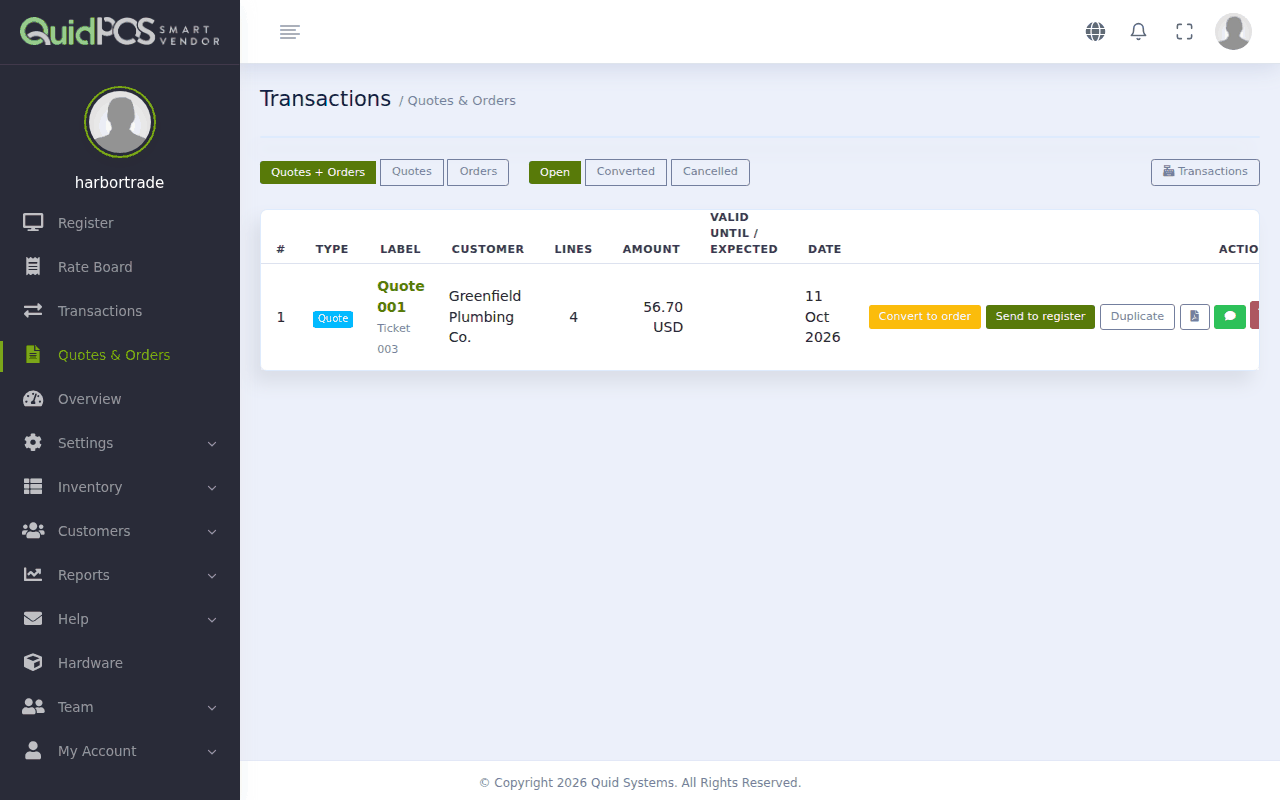
The buttons along the top choose what to show: Quotes + Orders, only Quotes, only Orders; and Open, Converted or Cancelled.
What each button on a row does
| Button | What it does |
|---|---|
| Convert to order | The customer agreed. The quote becomes an order. |
| Back to quote | Changes an order back into a quote. |
| Send to register | Opens it on the register so you can take payment now. |
| Duplicate | Makes a copy as a new quote. |
| Opens it as a printable document. | |
| Opens WhatsApp with a message and a link to the document. | |
| Void | Cancels it. |
Click the quote's or order's name to see all its lines and to email it.
Finish an order when the customer comes in
- On the register, click the ticket button. Orders are in the list with your open tickets.
- Choose the order.
- Check the items, then click CHECKOUT and take payment as usual.
Or, from the Quotes & Orders page, click Send to register.
Does an order reduce my stock?
No. Stock goes down when the sale is completed. The Overview page shows the total value "on order" so you can see what is promised. See The Overview page: your business at a glance.
Can I change the items on a quote?
Yes. Click Send to register, change the ticket, then click Save as quote again.
Can I take a deposit on an order?
Yes. Send it to the register, click CHECKOUT, and enter the deposit amount. See Take a deposit or a part payment.
Did this answer your question? If not, email us and tell us what you were trying to do. We read every message.