
Stock report: what you have and what it is worth
A list of every stocked item with its quantity and value. Also how to spot what needs reordering.
Where to find it Open this screen in Quid POS
Go to .
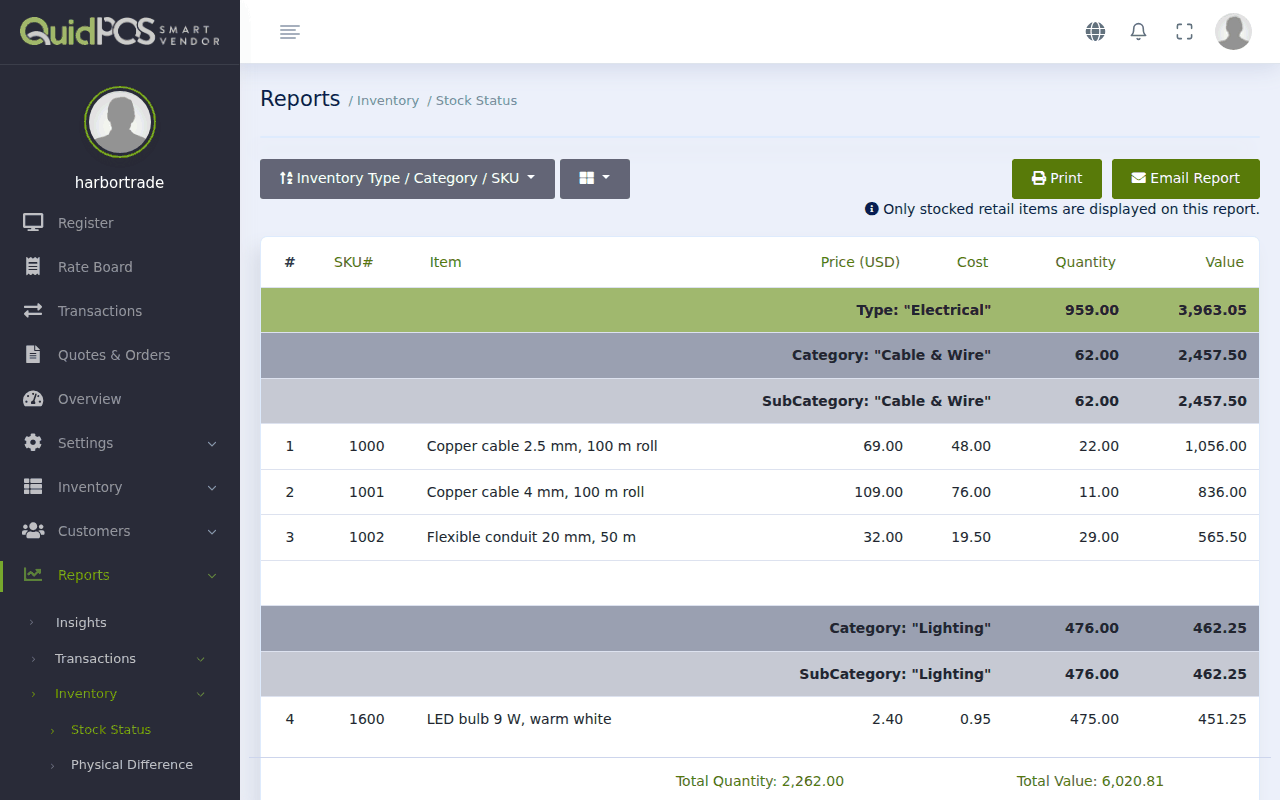
Choose what to show
- Sort order (first drop-down): by SKU, by Name, or grouped by Type and Category.
- Columns (the tick boxes): tick what you need. For a stock check, tick Item Name, SKU, Quantity and Value. For a price list, tick Item Name and the prices.
The Value column is quantity × cost. The total at the bottom is the value of all your stock.
Good to know
Only stocked retail items appear here. Services and items not marked "Stocked" are left out.
Find what needs reordering
Each item can have a Par level: the quantity at which you want to reorder. See Add an item to sell. Sort the report or the item list by quantity to see the lowest first, and compare with Par. Then order more.
Print a price list
Tick only Item Name, Size and the price columns you want, then click Print.
Send it to someone
Type an address beside Email Report to send the report by email.
NextTill count: check the cash in your drawer →Did this answer your question? If not, email us and tell us what you were trying to do. We read every message.