
The Overview page: your business at a glance
One page with today's sales, this month's sales, money owed to you, stock value and open quotes.
Where to find it Open this screen in Quid POS
Click in the menu. Everything on this page is worked out for you from the sales, customers and stock already in Quid.
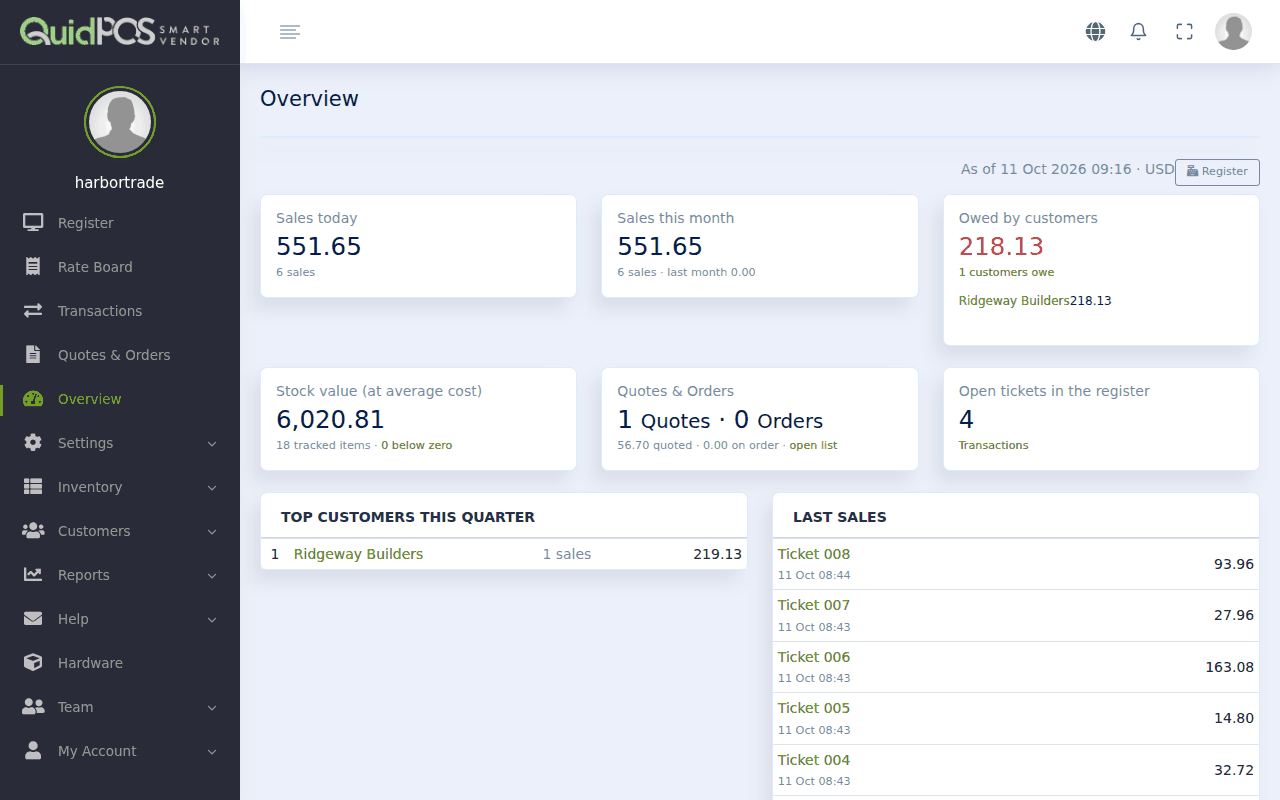
What each box means
| Box | Meaning |
|---|---|
| Sales today | Total of today's completed sales, and how many sales that was. |
| Sales this month | Total so far this month, compared with last month. |
| Owed by customers | The total your account customers owe you, and how many customers that is. Click it to see who. |
| Stock value (at average cost) | What the goods on your shelves cost you. "Below zero" counts items whose quantity has gone negative and needs correcting. |
| Quotes & Orders | How many quotes and orders are open, and their total value. |
| Open tickets in the register | Sales started but not finished. |
| Top customers this quarter | Who bought the most in the current three months. |
| Last sales | The most recent completed sales. |
The line at the top ("As of …") shows when the numbers were worked out and in which currency. The page refreshes about once a minute, so a sale you just made can take a moment to show.
A good daily habit
Look at this page at the end of each day and ask three questions:
- Are sales where I expected? If not, open the Sales report: what you sold and what you earned to see what sold.
- Is "Owed by customers" growing? If so, send statements and follow up.
- Any items "below zero"? Then a delivery was not entered or a count is wrong. See Count your stock and correct the numbers.
Did this answer your question? If not, email us and tell us what you were trying to do. We read every message.