
Organise your items into groups (Types and Categories)
Set up groups such as "Electrical" and "Plumbing" so items are easy to find and your reports make sense.
Think of your stock room. Things of the same kind are kept together so you can find them. Quid works the same way, with up to three levels:
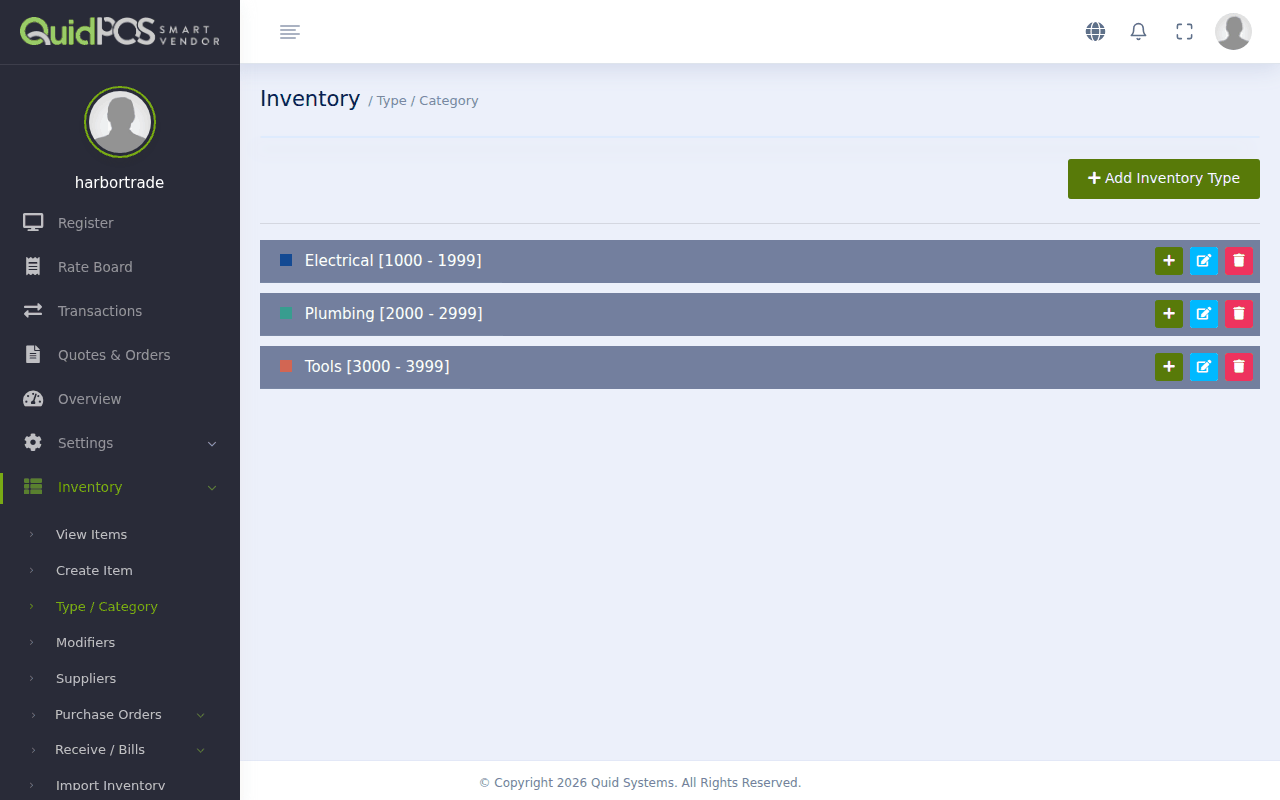
- A Type is the biggest group, like a department: "Electrical", "Plumbing", "Tools".
- A Category is a group inside a Type: "Cable & Wire", "Lighting".
- A Sub-category is a group inside a Category. Most small shops do not need this level. If you do not create one, Quid makes one for you with the same name as the category.
Keep it simple. Three to eight Types is plenty for most shops. You can add more later.
Create a Type
- Go to .
- Click Add Inventory Type.
- Type a name, for example "Electrical".
- Choose a colour. Items of this Type get a border in this colour on the register, so staff can spot them quickly.
- Set the number range (explained below). If you are not sure, accept what Quid suggests.
- Save.
Create a Category inside a Type
- Next to the Type, click Add Category.
- Type a name and save.
To go one level deeper, click Add SubCategory next to a Category.
What are the number ranges for?
Every item in Quid gets its own number, called a SKU (say "skew"). It is short for "stock keeping unit" and is simply the item's ID number.
Each Type owns a block of numbers, and each Category owns a slice of its Type's block. When you add an item to "Lighting", Quid gives it the next free number in the Lighting slice. That way you can tell from a number roughly what the item is.
Rule of thumb: make each range about twice as big as you think you need. If you expect 300 electrical items, give Electrical 1,000 numbers. Running out is annoying; spare numbers cost nothing.
More about numbering: Item numbers (SKU) and barcodes.
Change or delete a group
Use Edit or Delete beside it. If you delete a group that still has items in it, the items are not deleted, but they lose their group and you will need to put each one into another group.
NextAdd an item to sell →