
Print order slips for a kitchen, bar or workshop
Send what needs to be prepared or picked to a second printer, before the customer pays.
Where to find it Open this screen in Quid POS
An order slip tells the people who prepare the goods what to make or fetch: the cook, the barista, the person in the warehouse. It lists the items and any notes, without prices.
Set it up
- Go to and switch on Enable Ticket Orders. Click Update Settings.
- Go to . On your register, click Configure Order Printer.
- Add the printer:
- give it a name that says where it is ("Kitchen", "Bar", "Warehouse"),
- choose it from the list of connected printers, or enter its address on your network (see Set up a Star Micronics network printer),
- choose the paper width (2, 3 or 4 inch),
- choose the paper type: Normal, or Black mark labels for sticky labels.
- Click Test Configuration to print a test slip, then save.
Print an order
- Ring up the items on the register as usual.
- Before the customer pays, click the printer button above the ticket and choose Print Orders.
The slip comes out of the order printer. You can then complete the sale now or later.
Missed it? Go to , find the sale and print the order again from there.
Options
In :
- Print Order Items Separately: one slip per item instead of one slip for the whole order. Good for sticky labels on cups or parcels.
- Print Identical Items Separately: three of the same item print as three slips rather than "3 ×".
Paper tips for thermal printers
- Thermal paper prints on one side only. If the slips come out blank, the roll is in upside down. Follow the little picture inside the paper cover.
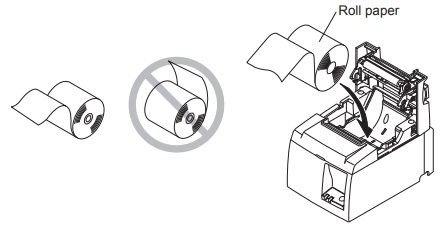
The paper must feed from the bottom of the roll. - Thick paper or label rolls may need the tension bar removed. If labels stick inside the printer, take the bar out.
- Narrow rolls (2 inch) need the paper guide moved in.
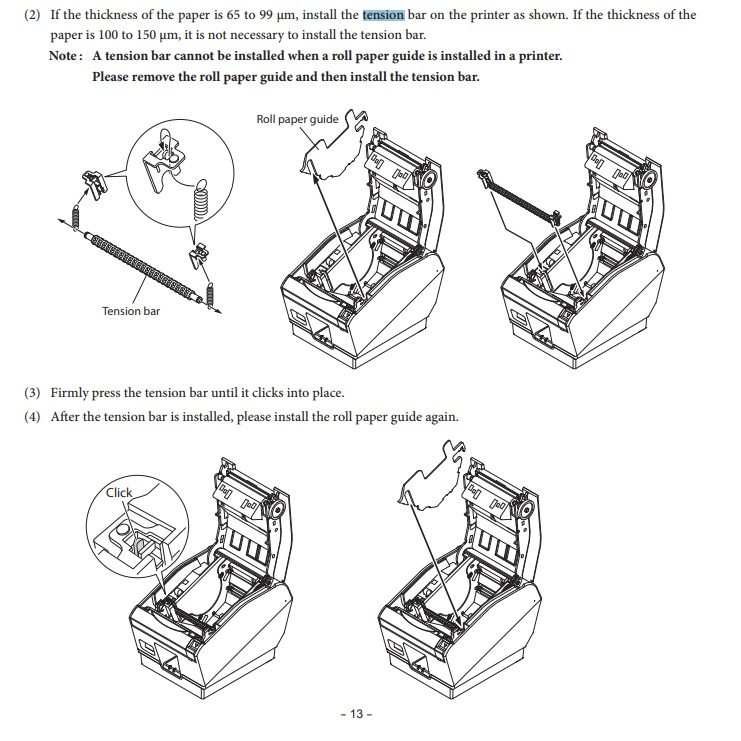
The tension bar and the roll guide (from the Star manual).
Did this answer your question? If not, email us and tell us what you were trying to do. We read every message.