
Currencies: accept more than one kind of money
Choose your own currency, show a second and third on the register, and set the exchange margin.
Go to .
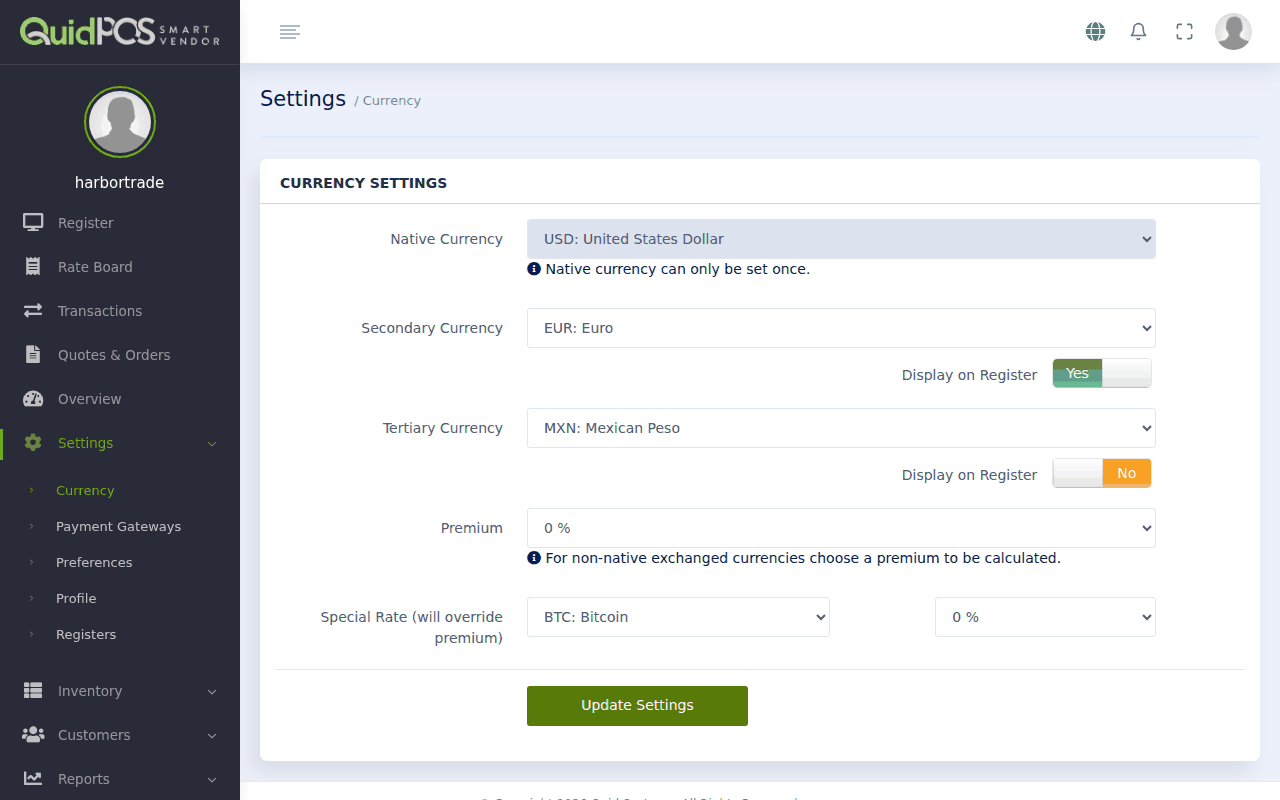
Native currency
This is your own money: what your prices are in and what your reports add up in. It was chosen when the account was created and cannot be changed afterwards. If it is wrong, contact us.
Second and third currency
If customers sometimes pay with other money (tourists with US dollars, for example), choose it as your Secondary Currency. You can add a third as Tertiary Currency.
Switch on Display on Register for each one you want the register to show. The ticket then shows the total in that currency too, using up-to-date exchange rates, and you can accept it at checkout. See Take payment: cash, card, or a mix.
Not needed? Switch Display on Register off for both, and the register shows only your own currency.
Premium: your margin on exchange
Banks and exchange offices charge you when you change foreign money. The Premium covers that cost. It is a percentage added when a customer pays in a currency that is not your own.
Example: with a premium of 5%, a customer paying in dollars is charged 5% more than the plain exchange rate would give.
Choose 0% if you do not want to add anything.
Special rate
Special Rate lets you pick one foreign currency and give it its own percentage, which replaces the premium for that currency only. Use it if you want to encourage (or discourage) one particular currency.
Click Update Settings to save.
Want to check a rate before agreeing a price with a customer? Open the The Rate Board: live currency exchange rates.