
The Rate Board: live currency exchange rates
See what any currency is worth in any other, and work out a fair price for a customer paying with foreign money.
The Rate Board is a currency converter. It opens in its own tab and anyone can use it, even without logging in.
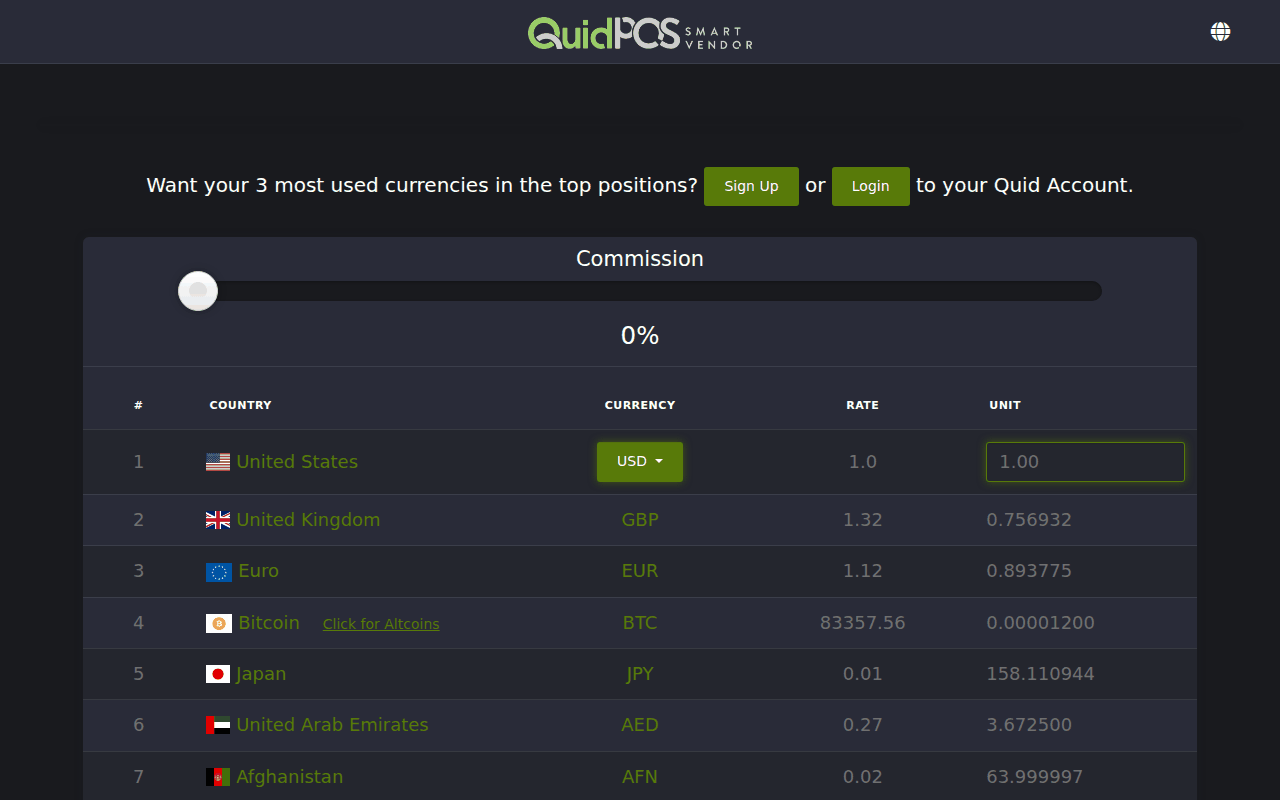
How to read it
- The top row is the currency you are converting from. Its rate is always 1.
- Every row below shows how much of that currency you get for one of the top currency.
- The Unit column converts any amount. Type an amount in the top row's Unit box and every row shows what it is worth.
To put a different currency on top, choose it from the drop-down list in the top row, or click any row's currency code.
Example
A tourist wants to know the price in US dollars of an item marked 350 pesos.
- Put MXN in the top row.
- Type 350 in its Unit box.
- Read across the USD row: that is the price in dollars.
The Commission slider
Changing money costs you something at the bank. Slide Commission to the right to add a percentage. All the amounts change to include it. This is a quick way to decide what margin to charge.
When you have settled on a percentage, set the same number as your Premium in , so that the register uses it automatically. See Currencies: accept more than one kind of money.
The rates are refreshed every few minutes.
NextRecommend Quid and earn (referral and affiliate programmes) →