
Your business details and logo
The name, address, phone number and logo that appear on your receipts, quotes and invoices.
Where to find it Open this screen in Quid POS
Go to .
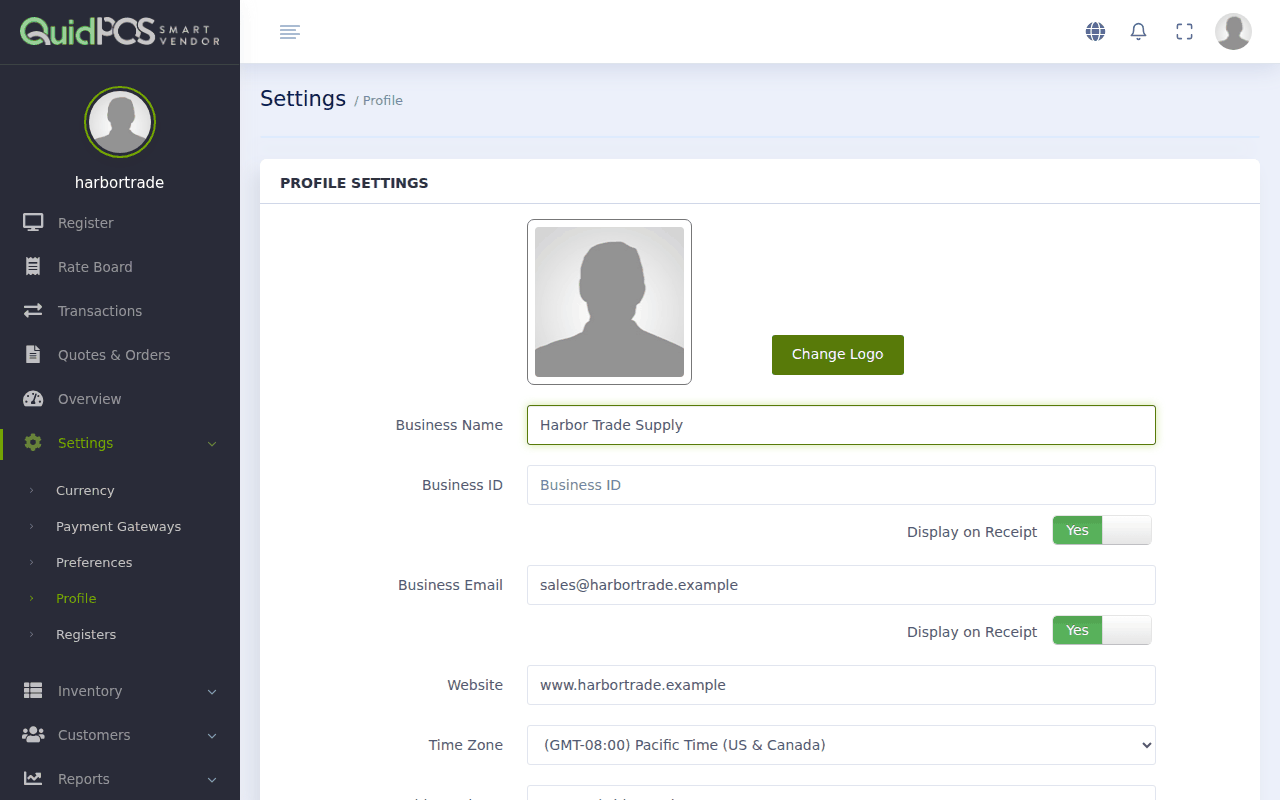
Fill in the boxes
| Box | What to type |
|---|---|
| Business Name | Your trading name, as customers know it. |
| Business ID | Your tax or registration number (TIN, RFC, VAT number, ABN…). Many countries require it on receipts. |
| Business Email | The address customers should write to. |
| Website | Optional. |
| Time Zone | Where your shop is. This sets the times on receipts and reports. |
| Address, City, State, Zip | Your shop's address. |
| Contact No | Your shop's phone number. |
Beside several boxes is a switch, Display on Receipt. Switch it on for each detail you want printed on receipts.
Click Update Settings at the bottom to save.
Add your logo
- Click Change Logo.
- Choose a picture file from your computer: PNG or JPEG, square, at least 150 × 150 pixels.
- Save.
The logo appears at the top of your PDF quotes, invoices and statements.
Tip
A simple logo on a white background prints best. If you do not have one, leave it empty; your business name is printed instead.
The times on my receipts are wrong by an hour or more.
Check Time Zone on this page.
Can I change my currency here?
No. The native currency is chosen once when the account is created. See Currencies: accept more than one kind of money.
Did this answer your question? If not, email us and tell us what you were trying to do. We read every message.